Plug-and-Play Multi-Room Audio

Harmony A0

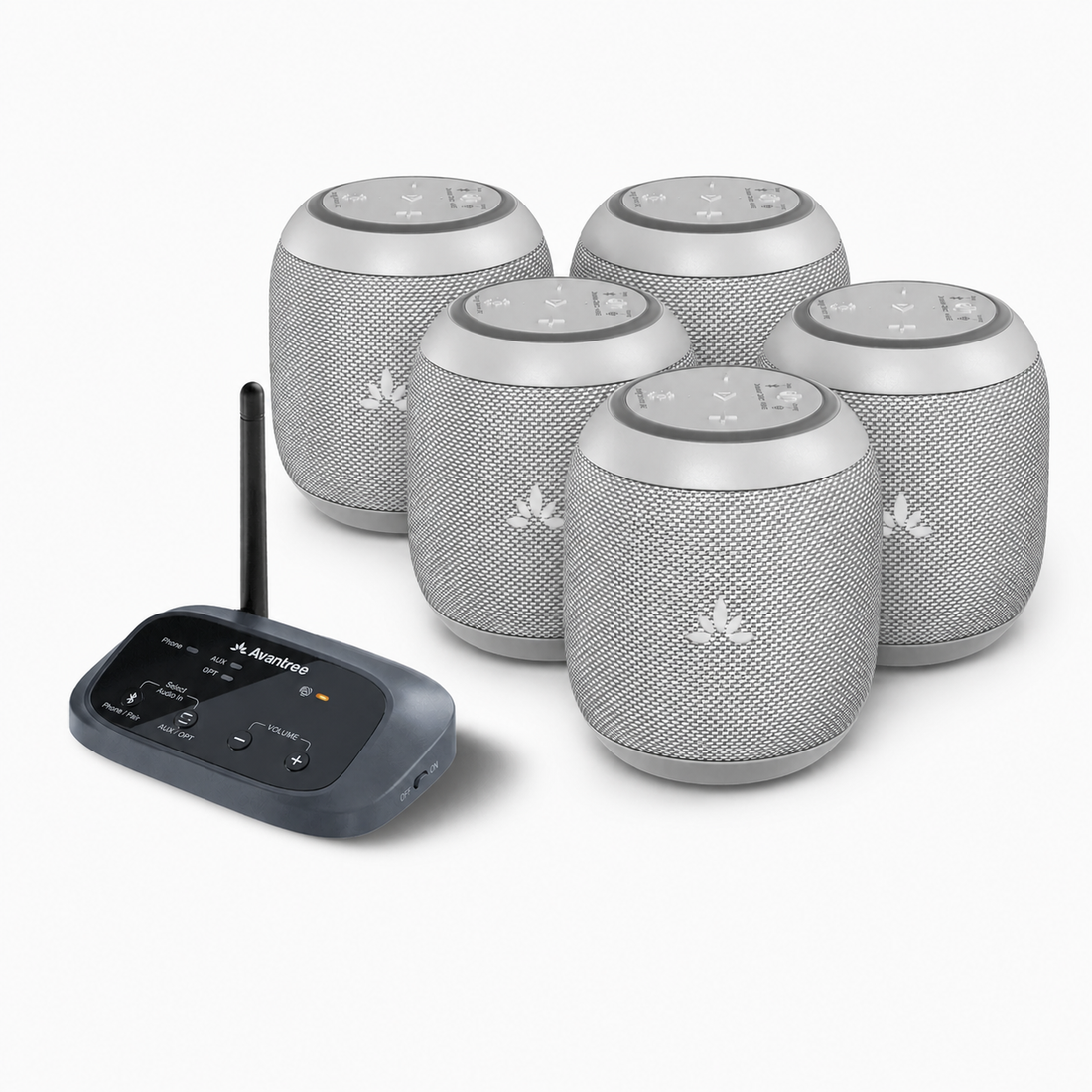
Plug-and-play background music with no Wi-Fi or pairing. Five included speakers deliver wider coverage, with room to expand.

5 Included speakersOptical, 3.5 mm AUX, Bluetooth Audio inputsUp to 328 ft line-of-sight Wireless range

Checking the fastest delivery option…

Firmware Update Alerts

Get notified when new Harmony A0 firmware is available.

Firmware updates only. No marketing emails.
Fast ShippingReliable Delivery
60-Day Free ReturnsHassle-Free
Bulk DiscountVolume Pricing Available
Free Setup SupportVenue Specialist Included
  • BACKGROUND MUSIC, NOT A PARTY SPEAKER – Enjoy clear, evenly distributed sound across multiple rooms without turning one speaker excessively loud. Ideal for homes, cafés, salons, clinics, waiting rooms and small commercial spaces. Not designed for bass-heavy parties or high-volume events.
  • NO WI-FI, APP OR PAIRING – Connect your audio source to the transmitter, turn on the speakers and start listening. The five included speakers connect automatically without a Wi-Fi network, account setup or repeated Bluetooth pairing.
  • WIDER COVERAGE WITH FIVE SPEAKERS – Place the five included speakers across separate rooms, floors or customer areas, then add compatible Harmony speakers or additional transmitters as your space grows.
  • CENTRAL GROUP AND VOLUME CONTROL – Create speaker groups and adjust their volume from the central transmitter hub without walking to every speaker or relying on a Wi-Fi app.
  • SPEAKERS AND PERSONAL HEARING TOGETHER – Share the same Auracast broadcast with compatible speakers, headphones, earbuds, receivers and hearing devices.
Harmony A0 $299.99

You Don’t Need New Auracast Hearing Aids

VenuCast works with the hearing devices people already use.

  1. Venue Audio
  2. Auracast
  3. Choose how you listen
Modern Auracast hearing aid

Auracast hearing aids

Connect directly to the Auracast broadcast.

Direct Auracast

Traditional hearing aids with an AuraCoil receiver

T-Coil hearing aids

Use AuraCoil to hear through the hearing aid’s T-Coil.

AuraCoil

Traditional Bluetooth hearing aids Aura C receiver connected to a phone

Bluetooth hearing aids

Use Aura C as a bridge for compatible Bluetooth hearing aids.

Aura C

AuraClip Auracast receiver VenuCast wired on-ear headphones

No hearing aids

Use a receiver with headphones or earbuds.

Receiver + Headphones

Bottom line: One Auracast broadcast can serve many different listeners.

01 · Build your system

View all Add-ons & Accessories

02 · How it works

How it works with your devices

Audio sources

  • Optical
  • 3.5 mm AUX
  • Bluetooth
Find the right cable

Product

Harmony A0
Harmony A0

Listener pathways

  • Room speakersCompatible Harmony Auracast speakers
  • Personal hearingCompatible Auracast headphones, earbuds, receivers and hearing devices

03 · Where it fits

Where it fits

🏠 Homes

🏠 Homes

Distribute comfortable background music across separate rooms without relying on a Wi-Fi audio system.

☕ Cafés & Salons

☕ Cafés & Salons

Keep background music clear and evenly distributed across customer areas.

🩺 Clinics & Waiting Rooms

🩺 Clinics & Waiting Rooms

Provide low-level background audio across reception and waiting areas.

🏢 Small Commercial Spaces

🏢 Small Commercial Spaces

Extend audio to separate rooms, floors or service areas as the space grows.

04 · Product details

Product details

Key specifications

System configuration
1 transmitter + 5 speakers
Wireless connectivity
Bluetooth 5.4 / Auracast
Audio codec
LC3
Speaker synchronization latency
Approx. 60ms
Audio inputs
Bluetooth, optical, 3.5mm AUX
Transmitter-to-speaker range
Up to 100m / 328ft line of sight
Phone/PC-to-transmitter range
Within 15m / 50ft
Expandable speakers
Up to 100 compatible Harmony Aura speakers
Speaker power output
9W, THD ≤1%
Speaker playtime
Up to 10 hours

Simple setup

  1. 1Connect your audio sourceConnect the transmitter by Optical, 3.5 mm AUX or Bluetooth.
  2. 2Turn on the systemPower on the central transmitter and the five included speakers.
  3. 3Start listeningThe included speakers connect automatically without Wi-Fi, an app or repeated Bluetooth pairing.
In the box
  • 5 x Harmony A0 speakers
  • 1 x Oasis Aura transmitter
  • 5 x 1m / 3ft speaker charging cables
  • 1 x 1.5m / 5ft transmitter power cable
  • 5 x 2A USB adapters for speakers
  • 1 x optical audio cable (TOSLINK)
  • 1 x 3.5mm AUX audio cable
  • 1 x 1m USB-C to 3.5mm adapter cable

05 · Compare

Compare alternatives

FeatureCurrent productHarmony A0Harmony A1Harmony A2Harmony 2
Best forWider plug-and-play background music coverageExpandable indoor Auracast coverageEnhanced-sound multi-room audioLow-latency multi-room audio
Included speakers5 x 9W Harmony A0 speakers3 x 20W speakers3 x 20W speakers3 x 15W speakers
Audio inputsBluetooth, optical, 3.5mm AUXBluetooth, optical, 3.5mm AUXBluetooth, optical, 3.5mm AUXBluetooth, optical, 3.5mm AUX
Wireless technologyBluetooth LE Audio / AuracastBluetooth LE Audio / AuracastBluetooth LE Audio / Auracast2.4GHz wireless
Published rangeUp to 100m / 328ft LOSUp to 100m / 328ft LOSUp to 100m / 328ft LOSUp to 20m / 66ft
Typical latencyApprox. 60msApprox. 60msApprox. 60msApprox. 30ms
Speaker playtimeUp to 10 hoursUp to 8 hoursUp to 6 hoursUp to 6 hours

06 · Common questions

Common questions

Does Harmony A0 require Wi-Fi or an app?

No. Connect the audio source to the transmitter, power on the included speakers and start listening. The included speakers connect automatically without a Wi-Fi network or app.

Can I add more speakers later?

Yes. You can add compatible Harmony speakers or additional transmitters as your space grows. Actual range and system layout depend on walls, floors and wireless interference.

What wireless range should I expect?

The system supports up to 328 ft line-of-sight. Walls, floors and wireless interference may reduce the practical range.

Can room speakers and personal hearing devices listen together?

Compatible speakers, headphones, earbuds, receivers and hearing devices can receive the same Auracast broadcast, allowing people to listen through room speakers or a preferred personal device.

Do I need to restart the speakers when the audio source stops?

The speakers remain powered on when the audio source stops, so music can resume without restarting or reconnecting the system.

Designed for straightforward installation

Venue Audio Made Simple

No rewiring. No complicated setup. Connect Venucast to the audio system you already have.

Mixer / Soundboard / PA System
Auracast Transmitter
Auracast Hearing Aids / T-Coil Hearing Aids