TourCast

Auracast Microphone Transmitter for Tours & Teaching

Bring your voice directly to listeners on tours, in classrooms and during on-site training. Built-in mic or included wired headset mic. Receivers and headphones sold separately. Pre-order: ships March 31, 2027.

$199.99
Version:
Pre-order · Ships March 31, 2027
Ask a Question

Checking the fastest delivery option…

Fast ShippingReliable Delivery
60-Day Free ReturnsHassle-Free
Bulk DiscountVolume Pricing Available
Free Setup SupportVenue Specialist Included
  • Made for tours and teaching – A wearable microphone transmitter for guided visits, classroom instruction and on-site training.
  • Two ways to listen – Compatible Auracast hearing aids and dedicated receivers can hear the same commentary.
  • 10-hour battery life – Keep your voice with the group through extended tours and teaching sessions.
  • Flexible microphone use – Use the built-in mic or connect the included wired headset mic closer to your mouth.
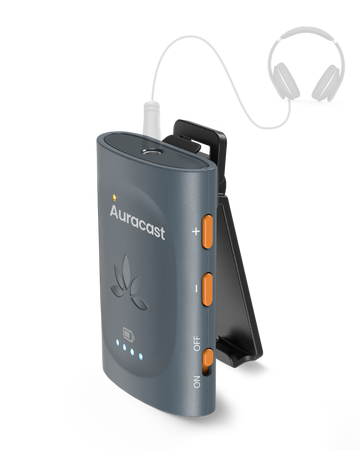
  • Receivers sold separately – Includes transmitter, wired headset microphone, lanyard and charging cable.
TourCast $199.99

01 · Before you buy

Best For

Made for guided tours, teaching and on-site training

  • Guided ToursDeliver live commentary as your group moves between exhibits and stops. Listeners use compatible Auracast hearing aids or receivers.
  • Classroom TeachingMove around the classroom while students listen through compatible receiving devices.
  • On-Site TrainingCarry your voice between training stations, showroom displays and demonstrations.

Before buying

Compatibility

Check the audio source feeding TourCast and how each listener will hear the broadcast.

A. Audio source compatibility

Connect your existing venue audio

  • Auracast-enabled hearing aidsAuracast reception must be supported and enabled.
  • Compatible Auracast receiversUse with suitable wired headphones where required.

Find the right cable

B. Listening device compatibility

Choose a direct or receiver-assisted path

× Standard Bluetooth-only headphones
Not directly compatible. Bluetooth alone does not provide Auracast reception.
× Wired headphones without a receiver
A compatible Auracast receiver is required and sold separately.
× Original AudiTour 2.4 GHz receivers
Not compatible with TourCast. Original 2.4 GHz receivers use a different wireless system.
Receivers and headphones sold separately
Each listener needs a compatible receiving device. Device and app support may vary.
Check Hearing Aid Compatibility
Not sure TourCast works with your listening devices? Find My Setup

02 · Product Details

What's Included

  • 1 × TourCast MT10 transmitter
  • 1 × Wired headset microphone
  • 1 × White Avantree / Venucast lanyard
  • 1 × Charging cable
  • Receivers and headphones sold separately

How It Works

Simple by design

One Voice. Multiple Listeners.

Use the built-in microphone or connect the included wired headset microphone. The wired headset places the microphone closer to your mouth for better voice pickup.

  • Built-in or wired headset microphone
  • Wear it, clip it or hold it
  • Compatible Auracast listening devices required
1
Choose your microphone Clip on or hold TourCast to use its built-in mic, or connect the included wired headset microphone to the side mic input.
2
Start your broadcast Power on TourCast and follow the setup instructions to begin broadcasting.
3
Let your group join Listeners join with compatible Auracast hearing aids or receivers. Wired headphones connect to a suitable receiver.

Technical Specifications

Model / SKU
MT10 / VTC-MT10
Product type
Portable Auracast microphone transmitter
Broadcast
Auracast
Microphone options
Built-in mic / included wired headset mic
Battery life
10 hours
Coverage (line of sight)
TBC
Typical audio latency
TBC
Bluetooth version
TBC
Supported audio codecs
TBC
Sample rate
TBC
Microphone input specification
TBC
Battery capacity
TBC
Charging port / Power requirements
TBC / TBC
Charging time
TBC
Dimensions / Net weight
TBC / TBC
Package dimensions / Packaged weight
TBC / TBC
Specification note
TBC = To be confirmed. Final specifications will be updated.

03 · Setup & Config

Setup Downloads

Venue signage, listener materials, and hearing-aid connection guides.

View downloads

Troubleshooting

Get help with TourCast compatibility, listening devices and setup.

Get help

04 · Addons & Accessories

Common Questions

TourCast FAQ

What’s included? Do visitors need their own listening devices?
Includes one TourCast transmitter, wired headset microphone, lanyard and charging cable. Each listener needs a compatible Auracast receiving device. Receivers and headphones sold separately.
Which listening devices are compatible? Will original AudiTour receivers work?
TourCast works with compatible Auracast hearing aids and receivers. Hearing aids must support and enable Auracast reception. Wired headphones need a receiver. Original AudiTour 2.4 GHz receivers are not compatible.
Do I have to connect the wired headset microphone?
No. Clip on or hold TourCast to use its built-in mic. The included wired headset microphone lets you place the mic closer to your mouth for better voice pickup.
Can visitors join by scanning a QR code?
Yes. A QR code can be generated for the Auracast broadcast. Visitors with compatible phones or hearing-aid apps can scan it to join. Venues can print and display the QR code at entrances or listening areas. Device and app support may vary. See compatible devices and QR Code details
Can I split this system into separate listening groups?
Yes. Each group needs its own transmitter. For example, 2 TourCast transmitters and 10 compatible headphones or receivers can form 2 groups of 5, each listening to different audio simultaneously. This listing includes one transmitter; additional transmitters and listening devices are sold separately. See how separate listening groups work
Can two people use separate microphones at the same time?
Simultaneous two-microphone use is not confirmed for the launch version.