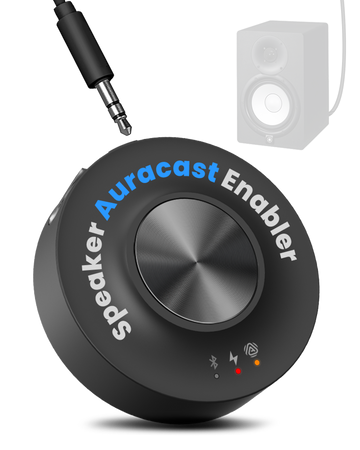
AuraLink 3-Pack

Auracast & Bluetooth Receiver for Powered Speakers

Add compatible Auracast reception to three existing powered speakers or audio systems.

$199.99
Ask a Question

Checking the fastest delivery option…

Fast ShippingReliable Delivery
60-Day Free ReturnsHassle-Free
Bulk DiscountVolume Pricing Available
Free Setup SupportVenue Specialist Included
  • Play One Source on More Speakers – Use three AuraLink receivers to distribute one compatible Auracast broadcast across powered speakers.
  • Works with Existing Powered Speakers – Add Auracast reception through compatible 3.5mm AUX or RCA inputs.
  • Public Auracast Reception – Join supported public broadcasts from compatible venue transmitter systems.
  • Portable or Plug-In – Use the built-in battery for mobile setups or continuous power for fixed installations.
  • Stays Ready When Powered – Keep AuraLink on while connected to power for always-ready speaker zones.
  • Up to 100 m (328 ft) LOS – Support distributed speaker installations under suitable line-of-sight conditions.
AuraLink 3-Pack $199.99

01 · Best for

Best For

Reuse existing speakers across your venue

  • Church & WorshipDistribute one Auracast program feed to powered speakers in several listening areas.
  • Classroom & TrainingAdd shared broadcast audio to existing powered classroom speakers.
  • Conference & Lecture HallReceive public Auracast audio through compatible installed audio systems.
  • Multi-Room & Shared SpaceExtend one audio source to multiple powered speakers without replacing the speaker system.

Before buying

Compatibility

Check the audio source feeding AuraLink 3-Pack and how each listener will hear the broadcast.

A. Audio source compatibility

Receive an existing audio broadcast

  • Oasis Aura transmitter
  • DG60 Aura computer transmitter
  • Compatible public Auracast broadcast

B. Listening device compatibility

Choose a direct or receiver-assisted path

Powered speakers or audio system
Connect to a compatible AUX input. An audio connection does not power a passive speaker.
Passive speakers need an amplifier
Connect through a suitable amplifier rather than directly to passive speakers.
Auracast or Bluetooth source
An external broadcast or paired Bluetooth source is required; this receiver does not transmit.
Check Compatibility
Need help choosing AuraView 4-Pack for your venue? Find My Setup

Requires powered speakers, an amplifier or an audio system with a compatible 3.5mm AUX or RCA input. Passive speakers need a separate amplifier.

02 · Addons & Accessories

Expand Your System

Compatible transmitters and listening accessories

View all add-ons & accessories

03 · Product Details

What's Included

  • 3 x AuraLink receivers

How It Works

Simple by design

Connect your speakers, join a broadcast, adjust volume

Use the speaker, transmitter or source controls to set the listening level.

  • Existing powered speakers
  • Public Auracast auto-search
  • Battery or plug-in operation
1
Power the receiver Use its battery or suitable USB-C power.
2
Connect the audio system Connect to a compatible powered speaker or amplifier input.
3
Join and listen Start an open broadcast, or follow the guide for secured broadcast setup.

Technical Specifications

Included receivers
3 AuraLink units
Audio output
3.5mm AUX or RCA to powered speakers and audio systems
Power modes
Built-in battery or continuous plug-in power
Broadcast support
Compatible public Auracast broadcasts
Operating range
Up to 100 m (328 ft) line of sight
Suggested venue size
Up to 500 seats
SKU
VRC-318-3
Net weight
66 g
AuraLink
SKU: VRC-318-BLK · Quantity: 3 · Package dimensions: 18 × 13.3 × 11.3 cm · Packaged weight: 100 g · Net weight: 22 g · Carton dimensions: 49 × 28.3 × 24.7 cm · Units per carton: 92

04 · Setup & Config

User Guide

Power, speaker connections, Auracast and Bluetooth operation.

Open guide

Firmware & Configuration

AuraLink firmware releases, update instructions and configuration support.

Current product record: V0.3.5 · Mar 30, 2026.
Open PC tool

Troubleshooting

AuraLink setup, connection and audio troubleshooting.

Get help

Compare Alternatives

FeatureAuraLink 3-PackShareCast Solo x3Harmony A1 - Wireless Speaker System for Cafes & Shops
Best forAdding Auracast to existing powered speakersThree-person clip-on speaker listeningA complete indoor multi-speaker system
Listener outputExisting powered speaker or audio systemThree personal clip-on speakersThree included 20W speakers
Transmitter requirementSeparate compatible Auracast transmitterSeparate compatible Auracast transmitterTransmitter included
Deployment formatPortable or plug-in external receiversBattery-powered clip-on speakersExpandable indoor speaker system
Published rangeUp to 100m / 328ft LOSUp to 30m / 100ftUp to 100m / 328ft LOS
Choose if you needTo reuse existing powered speakersPersonal no-headphone listeningA transmitter and speakers in one system

Common Questions

AuraLink 3-Pack FAQ

What is AuraLink 3-Pack designed for?

It adds compatible Auracast reception to three powered speakers or audio systems with 3.5mm AUX or RCA inputs.

Which speakers can I connect?

Use powered speakers, amplifiers or audio systems with a compatible 3.5mm AUX or RCA input. Passive speakers require a separate amplifier.

Is an Auracast transmitter included?

No. AuraLink 3-Pack receives an existing compatible public Auracast broadcast; a suitable transmitter or broadcast system is required.

Can AuraLink stay connected to power?

Yes. AuraLink can run from its built-in battery or remain plugged in for fixed speaker installations.

What is the expected operating range?

The published line-of-sight range is up to 100m / 328ft. Walls, interference and venue layout can reduce usable range.

What is included?

The verified pack contains three AuraLink receivers.